
When you’re building an application on real-time analytics infrastructure, things don’t always go according to plan. A data source might be misconfigured. A cloud storage bucket might have the wrong permissions. A schema might not match the data you’re ingesting.
These are ordinary problems. What matters is how quickly you can identify and resolve them.
Unfortunately, error messages in complex data systems aren’t always particularly helpful. You might get a Java exception, an internal hostname, or a stack trace that tells you something failed without explaining what you should do about it.
We’ve been working to improve that experience in StarTree’s Data Portal.
The goal is simple: When something goes wrong, give customers the information they need to understand the problem and take the next step, without hiding the technical details engineers need for troubleshooting.
When an error message creates more work than the error
Consider a real problem we encountered with a customer’s data preview.
The preview failed with this message:
java.io.IOException: Failed to index chunk 0
What did that mean? Was the data corrupted? Was there a problem with the file format? Was something wrong with the indexing process?
The actual cause was much simpler. An S3 bucket was in a different AWS region from the one configured on the connection, and S3 was returning a redirect.
The underlying exception contained that information. But somewhere between the storage layer and the Data Portal interface, the useful details had been lost.
Finding the cause required a multi-day investigation through backend logs.
This wasn’t an isolated incident.
In another case, a message reading “Could not schedule task” really meant that a configured file pattern hadn’t matched any input files. The message didn’t explain where the system had looked or what it had found.
These examples highlighted a problem we wanted to address: the system often had enough information to explain a failure, but we weren’t presenting it in a way that helped customers resolve it.
Making errors actionable
We’ve introduced a structured error catalogue in Data Portal to make troubleshooting more straightforward.
Instead of displaying raw exception messages, recognized failures are mapped to reviewed error descriptions that include:
- A meaningful title explaining what went wrong.
- A plain-language explanation of the problem.
- Suggested troubleshooting steps to help resolve it.
- A permanent error code that can be referenced in documentation or shared with Support.
- Detailed diagnostics available when deeper investigation is needed.
For example, on current releases the misconfiguration from that first story no longer ends in “Failed to index chunk 0.” The preview checks the bucket’s region before reading any data, and stops with a message that names the bucket, both regions and the setting to change:
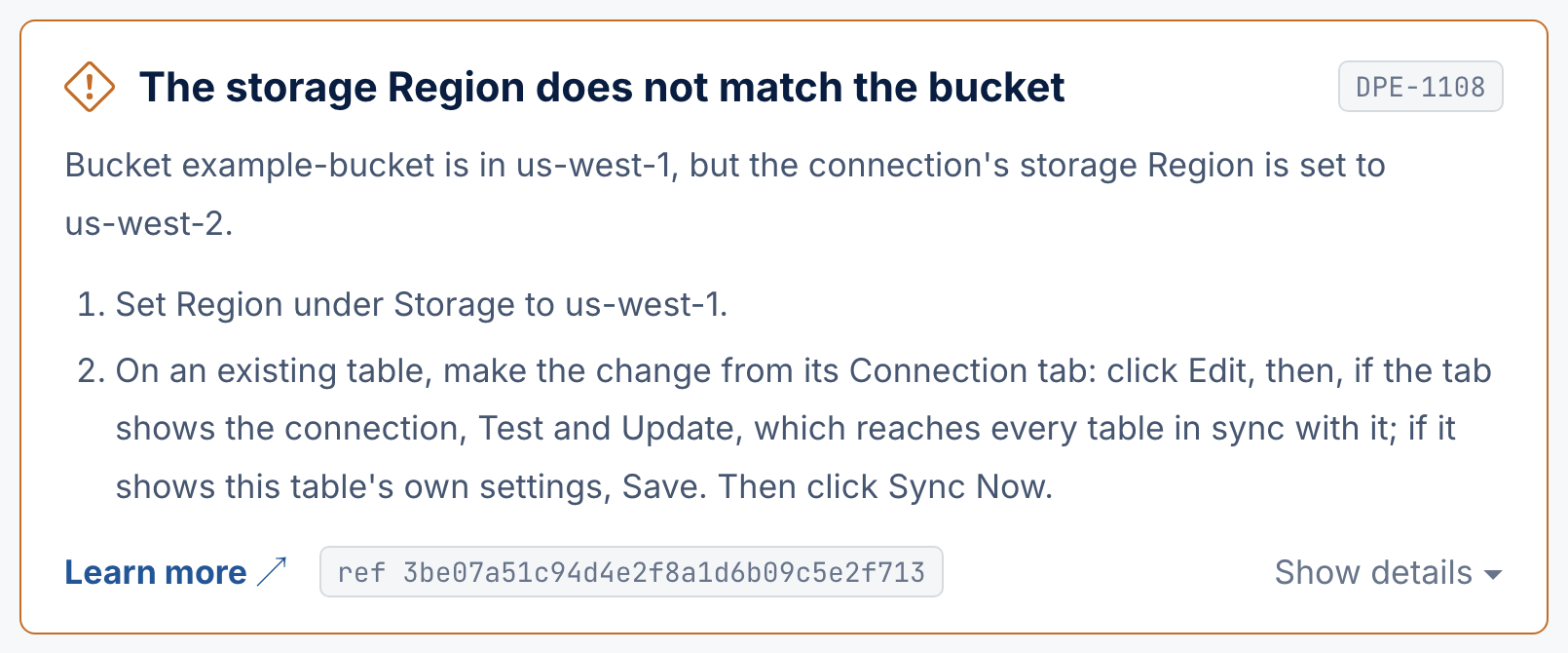
The new messages are designed to help customers make progress without requiring them to understand the internals of Apache Pinot, Java, or the infrastructure running behind Data Portal.
Clear explanations without losing technical detail
Simplifying an error message is useful, but there’s a tradeoff.
A customer troubleshooting an ingestion configuration probably wants to know what to check next. An engineer investigating an unexpected backend failure needs something different: the original exceptions and the complete chain of causes.
We designed the new error handling around both requirements.
The first layer presents the reviewed, customer-friendly explanation and suggested actions.
The second layer, accessible through Show details, preserves the underlying diagnostic information, including the original exception chain.
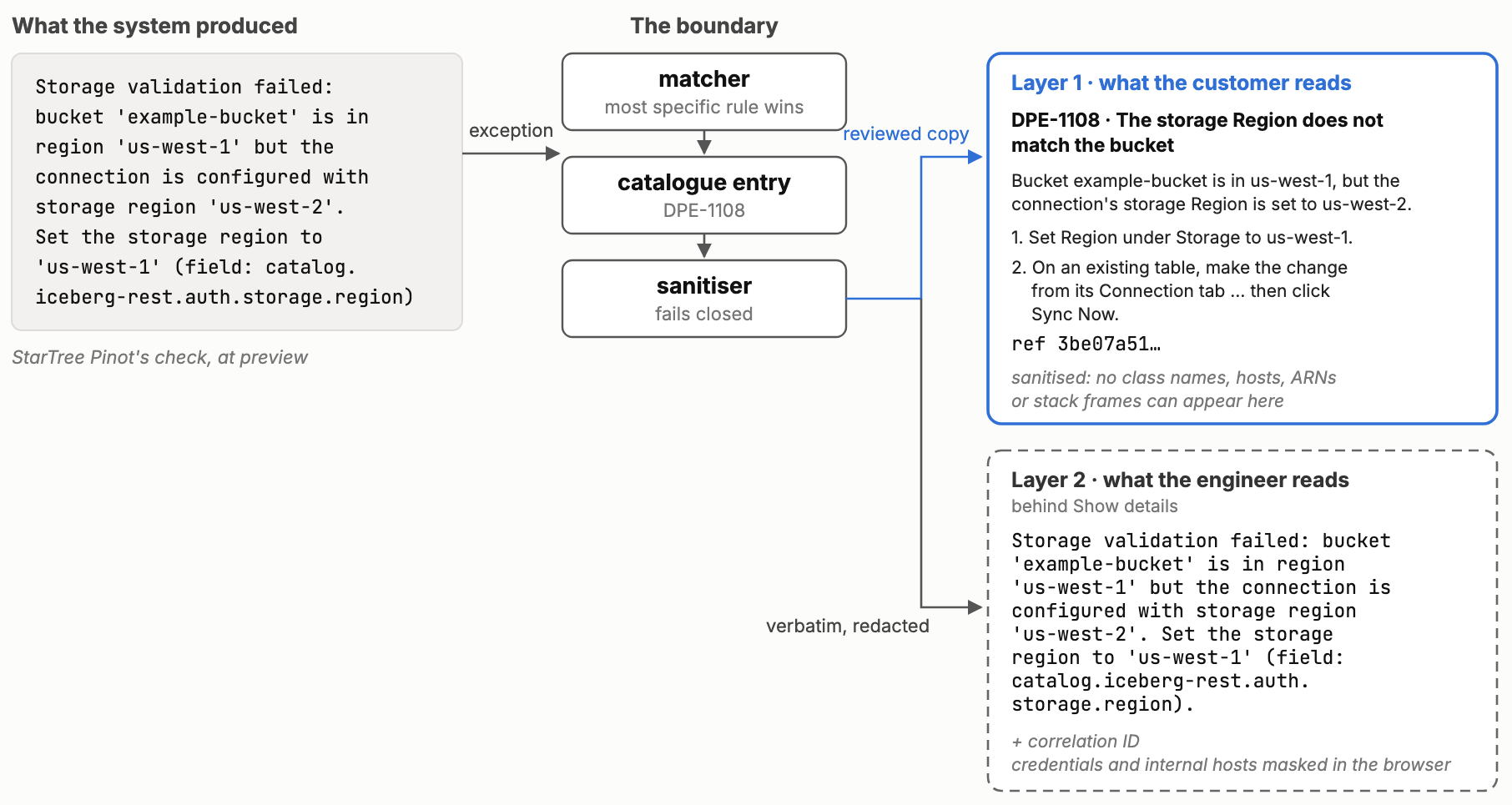
(It just stops being the thing they see first)
That separation is useful in cases like our S3 preview failure. The main error names the bucket, both regions and the setting to change in Data Portal. Expanding the details shows the message StarTree Pinot produced, including the name of the connection property behind that setting, for anyone who configures connections through the API.
The system also retains the original, unmasked diagnostics in our internal logs and error tracking tools.
Customers get a more understandable experience, while engineers and Support retain the information they need to investigate complex issues.
More consistent errors, designed for easier troubleshooting
Behind this experience is a catalogue of reviewed error definitions.
Each recognized failure is associated with a stable identifier. For example, DPE-1108 always means that the storage region set on a connection doesn’t match the bucket’s region.
That identifier doesn’t change when the surrounding explanation is improved. It gives customers and Support a consistent way to refer to the same problem.
The system identifies matching errors using structured technical information wherever possible, including error codes, exception classes, HTTP responses, and request paths.
This is more reliable than depending entirely on the wording of an exception, which can change between versions or come from multiple underlying systems.
We’ve also built safeguards into the catalogue.
The reviewed messages are checked so they can’t include internal information such as infrastructure hostnames, class names, cloud account identifiers or stack traces, and every catalogue definition is validated when the service starts. The technical details behind Show details are masked before they reach the browser: credentials and our internal hostnames are removed, while the customer’s own cloud identifiers, such as AWS role ARNs, are kept, because fixing a permission usually needs them.
To help ensure changes don’t break existing behavior, every build replays more than 650 recorded error messages, collected from production error tracking and from live test environments, through the catalogue.
The result is an error-handling system designed to provide consistent, actionable guidance while retaining the diagnostic information needed for more complicated failures.
Learning from errors we haven’t seen before
Of course, no error catalogue can anticipate every possible failure.
When Data Portal encounters an error that doesn’t match a known entry, it displays a safe generic message with a reference ID. That reference can be used by Support to locate the corresponding event in our diagnostic systems.
We’re also developing a process for using these unmatched errors to improve the catalogue over time.
The proposed workflow identifies frequently occurring errors, gathers technical evidence, and uses AI to help draft new catalogue entries for review.
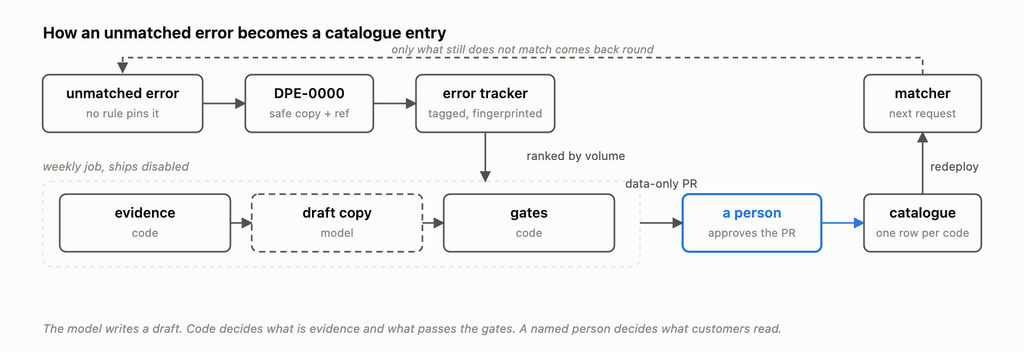
Crucially, we don’t publish those entries without human approval. Our testing demonstrated that a technically valid message can still misinterpret the underlying problem.
That workflow is not yet enabled. It remains subject to reviewer assignment and cleanup of unrelated monitoring noise in our error data.
Our aim is to make it easier to identify gaps in the catalogue and keep improving the guidance customers receive.
Better diagnostics are part of a better managed experience
Our new error catalogue is one example of how we’re making Pinot easier to operate. We’re working to turn failures into useful explanations, actionable troubleshooting steps, and consistent information that customers and Support can share.
When something goes wrong, we want you to spend your time fixing the problem, not trying to decipher the error message.
The error catalogue is enabled per StarTree Cloud environment. Where it’s on, look for the error code and Show details when troubleshooting a failure, and see the Data Portal error code reference for each code’s description and next steps.