
More and more organizations are storing analytical data in open table formats such as Apache Iceberg and Delta Lake, with Parquet files in object storage. This ‘lakehouse’ architecture offers portability, affordability and flexibility—but it also introduces a performance challenge.
With storage seperated from compute, a query engine behaves quite differently from when it owns and organizes the data itself. The key to performance lies in how efficiently a query engine can find and process the subset of external lakehouse data it needs to transfer to generate a result?
Trino is designed to query data where it already lives, and its Iceberg connector can use table metadata, partitioning, and file-level statistics to avoid unnecessary reads. ClickHouse is best known for the performance of its native MergeTree storage engine, but it can also be used to query lakehouse tables directly from object storage. Those approaches make both systems common candidates for anyone seeking to run SQL analytics over an open lakehouse.
There’s another approach that may be less familiar: StarTree, a managed analytics platform built on Apache Pinot. Pinot is a real-time distributed OLAP database designed for low-latency, high-concurrency analytics. With External Tables, StarTree is able to leverage Pinot’s lightweight indexes on data that remains in Parquet on object storage. Indexes enable the StarTree query engine to have finer grained information on what to rows to fetch in order to answer a query. With indexes you get almost the same ‘realtime’ performance without having to move or store the data in Pinot’s native format.
That architectural difference raises a useful question: when the same data stays in the lakehouse, how much does the query engine’s approach to data skipping and indexing matter?
To find out, we benchmarked StarTree, Trino, and ClickHouse OSS against the same Iceberg dataset on S3, using identical compute resources and analytical queries representative of observability workloads. The goal wasn’t to compare each system in its ideal native-storage configuration. It was to compare how they behave when the source of truth remains in an open table format—and the query engine has to do the work of making that data interactive.
Here’s what we found:
Dataset
We used a synthetic observability dataset modeled after real-world telemetry — the kind of wide-column, time-series metrics you’d see in monitoring and APM platforms.
| Property | Value |
|---|---|
| Total Rows | ~12.2 billion |
| Total Size on S3 | 770 GB |
| Storage Format | Apache Parquet |
| Storage Location | Amazon S3 (us-west-1) |
| Schema Type | Wide column (metrics with dimensions map) |
| Key Columns | org_id, metric, resolution, logical_timestamp, sum_rollup, latest_rollup, dimensions (MAP) |
System Configuration
Getting a fair benchmark right is harder than running the benchmark itself. Each of these systems has its own sweet spot, and we wanted each one configured at its best. Here’s what we did and why
Hardware & Infrastructure (Identical Across Systems)
Before diving into system-specific configs, one critical detail: every system ran on identical hardware. Same instance types, same cluster topology, same disk sizes. No system got a resource advantage.
| Role | Instance Type | Specs | Disk | Count |
|---|---|---|---|---|
| Coordinator | AWS EC2 m7g.xlarge | 16 GB RAM, 4 vCPUs | 128 GB | 1 |
| Workers / Servers | AWS EC2 r6gd.4xlarge | 128 GB RAM, 16 vCPUs | 800 GB | 4 |
The naming varies by system (Trino calls them “coordinator” and “workers”, ClickHouse has its “coordinator” and “servers”, Pinot uses “controller” and “servers”) but the topology is the same: 1 coordinator node for planning and routing, 4 worker nodes for data processing and S3 access.
StarTree (v14.0) using Iceberg Tables
StarTree builds on Apache Pinot for a fundamentally different approach from Trino and ClickHouse. To understand why, a quick analogy helps.
Imagine those 12.2 billion rows are books on shelves. Trino and ClickHouse look at the shelf labels (Iceberg metadata) to figure out which shelves to skip. That’s useful because you avoid entire aisles you don’t need. But once you pick a shelf, you still have to flip through every book on it.
Pinot can do something different. It builds an actual index — like a library card catalog — that tells you exactly which books on which shelves have what you’re looking for. You go straight to the right pages without flipping through anything.
Technically, here’s what happens:
- The Parquet files stay on S3 untouched. No copies, no format conversion.
- Pinot builds index-only segments: inverted indexes for exact lookups, range indexes for time-range scans, and sorted indexes for ordered access. These indexes reference the original Parquet columns as the data source. These indexes can be stored remotely, but can also reside locally when specifically pinned.
- At query time, Pinot consults its indexes first to identify exactly which rows match, then reads only the necessary column data from Parquet. The indexes do the heavy lifting and the Parquet files just serve the data.
The result: Pinot can skip irrelevant rows at the individual document level, not just the file or partition level. And all of this happens without duplicating the data.
Trino (v476) using Iceberg Connector
For optimal query performance, we utilized optimized Iceberg tables configured with proper, granular partitioning, improving upon the initial single-partition (org_id) setup.
CREATE TABLE iceberg_data."st-database"."iceberg_benchmark_partitioned"
WITH (
  format = 'PARQUET',
  partitioning = ARRAY['org_id', 'day(event_date)'],
  sorted_by = ARRAY['org_id', 'event_date']
) AS
SELECT *, from_unixtime(logical_timestamp / 1000) AS event_date
FROM s3_data."st-database"."iceberg-dataset";Code language: SQL (Structured Query Language) (sql)
This gives Trino what it needs: Iceberg manifest files that enable partition pruning (skip entire directories of files that can’t match) and column-level min/max statistics (skip individual files whose value ranges don’t overlap with the query predicates).
Is this still a fair comparison? Yes because real-world customers would typically already have their data partitioned this way. We gave Trino every reasonable advantage.
ClickHouse OSS (v26.2.5) using icebergS3Cluster
ClickHouse was the trickiest to configure fairly. Here’s why:
The most common ClickHouse OSS deployment uses MergeTree tables, its native columnar format heavily optimized for fast queries. But MergeTree converts Parquet into ClickHouse’s own format. That’s not querying data on S3; that’s ingesting it. It would be like comparing Pinot’s local tables (where data is fully indexed and stored in Pinot’s format) rather than external tables. Not apple-to-apple.
On the other end, ClickHouse’s s3Cluster() function reads raw Parquet directly from S3 with no metadata at all — no partition pruning, no statistics. That unfairly penalizes ClickHouse, since it’s essentially doing full scans.The right middle ground is icebergS3Cluster(). This is ClickHouse’s Iceberg integration that queries the exact same Iceberg tables we set up for Trino, utilizing same partition pruning, and same column statistics, and same Parquet data on S3.
Queries
We picked four queries that cover the most common analytical patterns in observability workloads. Each one tests something different.
Q1: Filtered Count
A broad count across millions of rows, filtered by resolution and a one-hour time window. This tests raw scan throughput.
SELECT COUNT(*)
FROM iceberg_table
WHERE resolution = 15000
  AND logical_timestamp >= 1754229600000 - 3600000
  AND logical_timestamp <= 1754229600000
Q2: Selective Aggregation
A targeted SUM with tight filters on metric, org_id, resolution, and time range. This tests how well each system narrows down to a small set of matching rows.
SELECT SUM(sum_rollup)
FROM iceberg_table
WHERE metric = 'tk_cache'
  AND org_id = 184833768
  AND resolution = 15000
  AND logical_timestamp >= 1754229600000 - 3600000
  AND logical_timestamp <= 1754229600000Code language: JavaScript (javascript)
Q3: Time-Bucketed Aggregation
A GROUP BY with time bucketing which is the classic pattern behind every time-series dashboard chart.
SELECT dateTrunc('second', logical_timestamp) AS time_bucket,
       AVG(latest_rollup)
FROM iceberg_table
WHERE metric = 'tk_cache'
  AND org_id = '184833768'
  AND resolution = 15000
  AND logical_timestamp >= 1754229600000 - 3600000
  AND logical_timestamp <= 1754229600000
GROUP BY dateTrunc('second', logical_timestamp)
ORDER BY time_bucketCode language: PHP (php)
Q4: Map Column Aggregation
This filters on a nested map key (dimensions['node']), groups by another map key (dimensions['service']), and orders by the result. Semi-structured data access is notoriously difficult to optimize in columnar formats.
SELECT dimensions['service'] AS service,
       SUM(sum_rollup) AS total_value
FROM iceberg_table
WHERE metric = 'tk_cache'
  AND org_id = '184833768'
  AND resolution = 15000
  AND dimensions['node'] = 'xyz'
  AND logical_timestamp >= 1754229600000 - 360000
  AND logical_timestamp <= 1754229600000
GROUP BY dimensions['service']
ORDER BY total_value DESCCode language: PHP (php)
Implementation
We used Apache JMeter with all four queries in a single thread group, running in a loop. Single-threaded, sequential execution — measuring per-query latency without concurrency noise.
| Parameter | Without Cache | With Cache |
|---|---|---|
| Warmup Runs | 5–10 queries per system | 5–10 queries per system |
| Benchmark Loops | 100 | 100 |
| Threads | 1 (sequential) | 1 (sequential) |
Every system was warmed up before recording. The numbers you see below are all post-warmup.
A Note on Pinning and Caching
To minimize S3 reads, Trino and ClickHouse OSS use a traditional File System (FS) cache for previously read data. StarTree utilizes two independent layers: Index Pinning (preloading index files to disk to prevent remote reads) and a Disk Page Cache (for Parquet data pages).
To accurately isolate the performance impact of each layer, we benchmarked Pinot across three distinct modes: no local storage, index pinning only, and index pinning combined with the disk page cache.
Results
Without Cache
These are cold queries — every execution reads from S3. No local caching for any system.
| Query | StarTree Avg (ms) | Trino Avg (ms) | ClickHouse Avg (ms) |
|---|---|---|---|
| Q1 – Filtered Count | 491 | 10,237 | 19,200 |
| Q2 – Selective Aggregation | 515 | 4,886 | 6,634 |
| Q3 – Time-Bucketed Agg | 645 | 5,486 | 7,451 |
| Q4 – Map Column Agg | 2,390 | 9,219 | 26,973 |
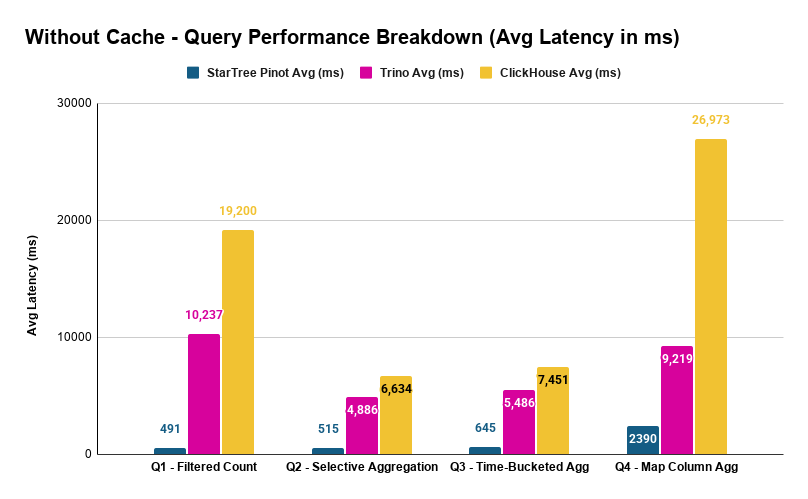
The speedups are dramatic:
| Query | Pinot vs Trino | Pinot vs ClickHouse OSS |
|---|---|---|
| Q1 | 20.8x faster | 39.1x faster |
| Q2 | 9.5x faster | 12.9x faster |
| Q3 | 8.5x faster | 11.6x faster |
| Q4 | 3.9x faster | 11.3x faster |
With Cache
Here we compare each system’s cached performance. For Trino and ClickHouse, that’s FS cache. For Pinot, we show index cache only — indexes pinned in local disk, Parquet data still read from S3 — as it delivered the best overall results (more on the disk page cache below).
| Query | StarTree Avg (ms) | Trino Avg (ms) | ClickHouse Avg (ms) |
|---|---|---|---|
| Q1 – Filtered Count | 287 | 4,076 | 4,103 |
| Q2 – Selective Aggregation | 483 | 1,981 | 2,972 |
| Q3 – Time-Bucketed Agg | 615 | 2,213 | 3,038 |
| Q4 – Map Column Agg | 382 | 6,624 | 14,007 |
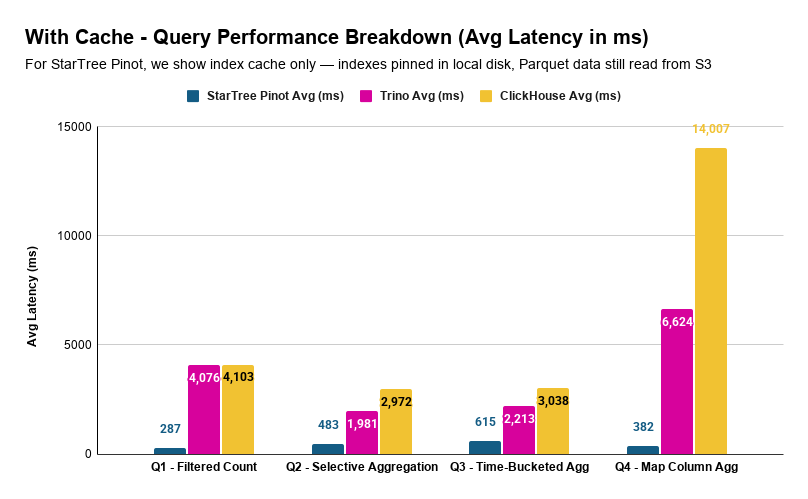
| Query | Pinot vs Trino | Pinot vs ClickHouse |
|---|---|---|
| Q1 | 14.2x faster | 14.3x faster |
| Q2 | 4.1x faster | 6.2x faster |
| Q3 | 3.6x faster | 4.9x faster |
| Q4 | 17.3x faster | 36.7x faster |
With index pinning, Pinot answers every query in under 650 milliseconds. The most complex query – Q4, the map column aggregation that takes ClickHouse OSS 14 seconds and Trino 6.6 seconds while Pinot handles it in 382 milliseconds.
Pinot’s Caching Layers
Pinot’s two caching layers have very different effects depending on the query pattern:
| Query | No Cache (ms) | Index Pinning Only (ms) | Index Pinning + Disk Page Cache (ms) |
|---|---|---|---|
| Q1 | 491 | 287 | 282 |
| Q2 | 515 | 483 | 1,211 |
| Q3 | 645 | 615 | 1,651 |
| Q4 | 2,390 | 382 | 457 |
Index pinning alone is the clear winner for Q2 and Q3 — adding disk page cache actually makes them slower (515ms → 1,211ms for Q2, 645ms → 1,651ms for Q3). Q4, on the other hand, benefits from both layers (2,390ms → 457ms).
The takeaway: for selective, index-accelerated queries, Pinot’s indexes are so effective at reducing data access that additional data caching adds overhead rather than value. The indexes themselves are the primary accelerator. For queries that touch expensive-to-read data like map columns, disk page caching provides additional benefit.
For selective, index-accelerated queries, Pinot’s indexes are so effective at reducing data access that additional data caching adds overhead rather than value.
Full Breakdown
StarTree (Pinot): Iceberg Tables
| Query | Avg (ms) | P90 (ms) | P95 (ms) |
|---|---|---|---|
| Q1 | 491 | 523 | 545 |
| Q2 | 515 | 554 | 564 |
| Q3 | 645 | 667 | 709 |
| Q4 | 2,390 | 2,418 | 2,440 |
| Q1 – index pinning | 287 | 296 | 320 |
| Q2 – index pinning | 483 | 508 | 538 |
| Q3 – index pinning | 615 | 643 | 679 |
| Q4 – index pinning | 382 | 385 | 393 |
| Q1 – index pinning + disk page cache | 282 | 288 | 305 |
| Q2 – index pinning + disk page cache | 1,211 | 1,260 | 1,292 |
| Q3 – index pinning + disk page cache | 1,651 | 1,683 | 1,711 |
| Q4 – index pinning + disk page cache | 457 | 459 | 507 |
Trino (v476)
| Query | Avg (ms) | P90 (ms) | P95 (ms) |
|---|---|---|---|
| Q1 | 10,237 | 10,658 | 11,008 |
| Q2 | 4,886 | 5,234 | 5,257 |
| Q3 | 5,486 | 5,648 | 5,723 |
| Q4 | 9,219 | 9,492 | 9,602 |
| Q1 – with FS cache | 4,076 | 4,611 | 4,764 |
| Q2 – with FS cache | 1,981 | 2,184 | 2,256 |
| Q3 – with FS cache | 2,213 | 2,364 | 2,630 |
| Q4 – with FS cache | 6,624 | 6,847 | 6,988 |
ClickHouse OSS (v26.2.5)
| Query | Avg (ms) | P90 (ms) | P95 (ms) |
|---|---|---|---|
| Q1 | 19,200 | 19,395 | 19,408 |
| Q2 | 6,634 | 6,712 | 6,743 |
| Q3 | 7,451 | 7,532 | 7,571 |
| Q4 | 26,973 | 27,081 | 27,146 |
| Q1 – with FS cache | 4,103 | 4,293 | 4,318 |
| Q2 – with FS cache | 2,972 | 3,144 | 3,187 |
| Q3 – with FS cache | 3,038 | 3,233 | 3,294 |
| Q4 – with FS cache | 14,007 | 14,458 | 14,679 |
Observations
Pinot’s Iceberg Tables are in a different league
The numbers speak plainly. Without any caching, Pinot is 9–39x faster than ClickHouse OSS and 4–21x faster than Trino depending on the query. With caching, Pinot is 5–37x faster than ClickHouse OSS and 4–17x faster than Trino.
To put that in perspective: ClickHouse OSS takes 19 seconds for Q1. Trino takes 10 seconds. Pinot takes 491 milliseconds — well under a second. That’s not an incremental improvement. It’s an order-of-magnitude difference.
The gap is widest on Q1 (broad scan) and Q4 (map columns) — exactly the query patterns where Pinot’s index-based approach has the most room to outperform metadata-only pruning. And it’s narrowest on Q2 and Q3 (selective aggregations), where tight predicates already reduce the data each system needs to process.
Trino consistently outperforms ClickHouse
Even though both Trino and ClickHouse OSS use the same Iceberg metadata on the same Parquet files, Trino is faster across every query:
- Q1: 10.2s vs 19.2s — 1.9x faster
- Q2: 4.9s vs 6.6s — 1.4x faster
- Q3: 5.5s vs 7.5s — 1.4x faster
- Q4: 9.2s vs 27.0s — 2.9x faster
This makes sense. Trino’s Iceberg connector has been battle-tested for years — its query planner knows how to aggressively push predicates into Iceberg’s metadata layer. ClickHouse’s icebergS3Cluster() is a newer capability, and the gap shows most clearly on Q4 (map columns) where query planning matters the most.
Map columns (Q4) are where systems diverge the most
Q4 is the outlier in every comparison. It filters on dimensions['node'] and groups by dimensions['service'] — nested key-value access inside a MAP column.
Here’s why this is so hard: when data is stored as Parquet, map columns are encoded as repeated key-value structures. Unlike top-level columns where min/max statistics can help skip entire row groups, map columns offer no such shortcut. The engine essentially has to scan the full map data to check if a particular key has a particular value.
ClickHouse OSS at ~27 seconds without cache on Q4 suggests it’s doing something close to a full scan of the map column. Trino at ~9 seconds handles it better but still takes roughly 2x its non-map queries. Pinot? 2.4 seconds without cache, 382 milliseconds with index pinning. That’s because Pinot extracts map keys into indexed columns during segment creation — filtering on dimensions['node'] becomes no different from filtering on a regular column like org_id. The map column penalty that plagues Trino and ClickHouse OSS simply doesn’t exist.
Pinot’s indexes eliminate work
Pinot’s query response includes statistics that show exactly how much work its indexes eliminate. Here’s what each query actually touched out of the 12.2 billion total rows:
| Query | Total Rows | After Segment Pruning | After Index Filtering | Data Eliminated |
|---|---|---|---|---|
| Q1 — Filtered Count | 12.2B | 3.91B | 811M | 93.4% |
| Q2 — Selective Agg | 12.2B | 3.91B | 80M | 99.3% |
| Q3 — Time-Bucketed Agg | 12.2B | 3.91B | 80M | 99.3% |
| Q4 — Map Column Agg | 12.2B | 3.63B | 25 | 99.9999998% |
Pinot filters data in two stages. First, segment pruning skips entire segments whose metadata (time ranges, partition values) can’t match the query — this is conceptually similar to what Trino and ClickHouse do with Iceberg manifest files. For Q1–Q3, this eliminates ~68% of the data.
The second stage is where Pinot pulls ahead: index filtering within the remaining segments. Inverted indexes on metric, org_id, and resolution narrow Q2/Q3 from 3.91 billion to 80 million matching rows — a 97.9% reduction that Trino and ClickHouse can’t achieve because they lack row-level indexes.Q4 is the most striking. The dimensions[‘node’] = ‘xyz’ filter — applied through an inverted index on the extracted map key — reduces 3.63 billion candidate rows down to exactly 25 matching documents. That’s a selectivity of 0.0000002%. No amount of file-level or partition-level pruning can come close to this kind of precision. It’s the difference between checking every book on a shelf and looking up exactly 25 entries in a card catalog.
Caching helps everyone — but reveals where the real bottleneck is
With caching enabled, all systems get faster since repeated S3 reads come from local disk:
| Query | Trino Improvement | ClickHouse OSS Improvement | Pinot Improvement |
|---|---|---|---|
| Q1 | 10.2s → 4.1s (2.5x) | 19.2s → 4.1s (4.7x) | 491ms → 287ms (1.7x) |
| Q2 | 4.9s → 2.0s (2.5x) | 6.6s → 3.0s (2.2x) | 515ms → 483ms (1.1x) |
| Q3 | 5.5s → 2.2s (2.5x) | 7.5s → 3.0s (2.5x) | 645ms → 615ms (1.0x) |
| Q4 | 9.2s → 6.6s (1.4x) | 27.0s → 14.0s (1.9x) | 2,390ms → 382ms (6.3x) |
A few things stand out.
Pinot benefits the least from caching on Q2 and Q3 — and that’s actually a good sign. These selective queries are already so fast (under 650ms) that there’s almost nothing left to cache. The indexes have already eliminated the bulk of the work. Caching is most useful when the system has to read a lot of data; when indexes pre-select exactly what’s needed, there’s less data to cache in the first place.
ClickHouse’s Q1 improves by 4.7x with caching — dropping from 19.2s to 4.1s, nearly matching Trino’s cached Q1 at 4.1s. That tells us something: without caching, ClickHouse’s Q1 bottleneck was primarily S3 I/O latency, not compute. Once you eliminate the I/O, the engines converge on a simple count query.But Q4 tells a different story. Even with caching, ClickHouse sits at 14 seconds while Trino is at 6.6 seconds. The I/O bottleneck is gone — what’s left is pure query execution efficiency on map column data. That 2x gap is in the engine itself, not in S3.
Low variance confirms the results are stable
Across all systems, the difference between average and P95 latency is tight — typically 5–10%. This held true across both cached and non-cached runs, meaning these aren’t noisy measurements. The numbers are stable and reproducible.
Resource efficiency – Pinot does more with less
Performance isn’t just about latency, it’s about what that latency costs in compute resources. We captured CloudWatch metrics across all three clusters during the without-cache/index-pinning benchmark runs.
| Metric (Worker/Server Avg) | StarTree | Trino | ClickHouse |
|---|---|---|---|
| CPU Utilization | 7.1% | 31.3% | 44.8% |
| Network In (GB) | 4.2 | 19.3 | 20.5 |
| Network Out (GB) | 0.024 | 0.101 | 0.076 |
| EBS Write (GB) | 0.002 | 0.002 | 1.55 |
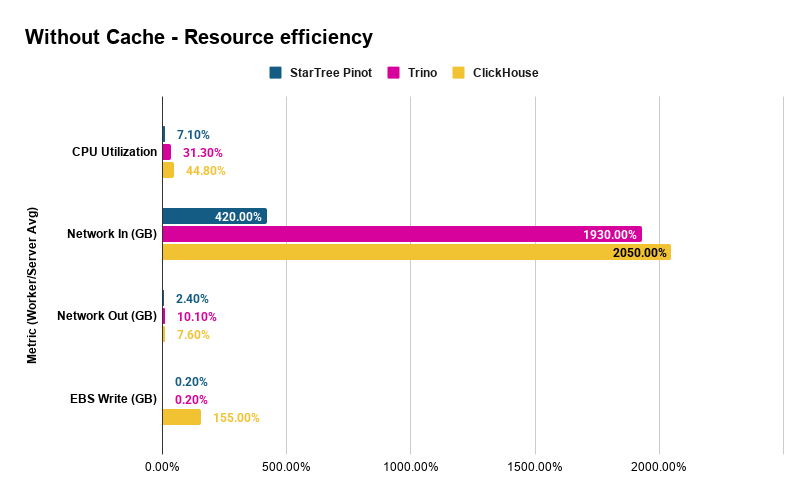
Three things jump out:
Pinot uses 4–6x less CPU. At 7.1% average CPU across four workers, Pinot is highly efficient while delivering sub-second latencies. Trino and ClickHouse sit at 31% and 45% respectively and take 5–27 seconds per query. Indexes eliminate the scan-and-filter work that dominates the other engines.
Pinot reads 5x less data from S3. Average network-in per worker is 4.2 GB for Pinot vs ~20 GB for Trino and ClickHouse. Pinot’s indexes identify exactly which Parquet row groups to fetch. The other systems, even with Iceberg partition pruning, read far more data to evaluate their predicates. Less data read means proportionally fewer S3 GET requests, a variable cost that scales directly with query volume.
ClickHouse writes significantly to disk, even without caching. At 1.55 GB average EBS writes per worker, ClickHouse spills intermediate data to disk during query processing. Pinot and Trino write essentially nothing. Under sustained workloads, these writes consume EBS IOPS and throughput budget and once you exceed gp3 baseline limits (3,000 IOPS / 125 MB/s), provisioned IOPS charges apply at $0.005/IOPS/month. This is a variable I/O cost that Pinot and Trino avoid entirely.
Cost per query – the economic case
All three systems ran on identical infrastructure. The cluster costs the same per hour regardless of which engine runs on it. The question is: how many queries does that hourly spend buy you?
Cluster cost (AWS on-demand, us-west-1):
| Component | Instance | Count | $/hr | Subtotal |
|---|---|---|---|---|
| Coordinator | m7g.xlarge | 1 | $0.19 | $0.19 |
| Workers / Server | r6gd.4xlarge | 4 | $1.04 | $4.16 |
| Total | 5 | $4.35/hr |
Sequential throughput (one query at a time, cycling through Q1–Q4):
Lower latency means more queries completed per hour on the same hardware. Using the average latencies from the without-cache benchmark, each loop (Q1 + Q2 + Q3 + Q4) takes:
| System | Avg Time per Loop (4 queries) | Loops/hr | Queries/hr |
|---|---|---|---|
| StarTree (Pinot) | 4.04s | 891 | 3,564 |
| Trino | 29.83s | 121 | 483 |
| ClickHouse | 60.26s | 60 | 239 |
On the same cluster, Pinot serves 7.4x more queries than Trino and 14.9x more than ClickHouse every hour.
Cost per query (without cache/index-pinning):
| System | $/Query | Relative Cost |
|---|---|---|
| StarTree (Pinot) | $0.0012 | 1x |
| Trino | $0.0090 | 7.4x more expensive |
| ClickHouse | $0.0182 | 14.9x more expensive |
Each ClickHouse query costs nearly 15x more than a Pinot query. Trino is 7.4x more expensive. Same hardware, same data, same queries but different architecture.
And this is the conservative estimate – single-threaded, no concurrency. In production with multiple users querying simultaneously, Pinot’s 7.1% CPU utilization means the cluster has massive headroom for concurrent queries that the other systems don’t have. Trino at 31% and ClickHouse at 45% are already consuming a substantial share of available compute with just a single query stream. Scale to realistic concurrency and Pinot’s cost advantage widens further.
Beyond compute, S3 and I/O costs widen the gap. The $/query numbers above reflect only the fixed cluster cost. But S3 API charges and EBS I/O are variable costs that scale with every query and they favor Pinot even further:
- S3 GET requests ($0.0004 per 1,000 GETs in us-west-1): Pinot’s workers read 5x less data from S3 (4.2 GB vs ~20 GB per node), which translates to proportionally fewer GET requests. At high query volumes, this adds up. A system doing 3,564 queries/hr at one-fifth the S3 requests per query has a materially lower S3 API bill than one doing 239 queries/hr at 5x the requests per query.
- EBS I/O: ClickHouse writes 1.55 GB per worker to EBS per benchmark run even with caching disabled. Across 4 workers, that’s over 6 GB of disk writes per run. Under sustained production load, this consumes EBS IOPS budget and can trigger provisioned IOPS charges. Pinot and Trino write essentially zero to EBS.
- Network bandwidth ceiling: Each r6gd.4xlarge supports up to 10 Gbps. Trino and ClickHouse consume ~20 GB of network-in per worker per run that’s 5x more than Pinot’s 4.2 GB. Under concurrent workloads, they’ll saturate network capacity sooner, forcing horizontal scale-out (more nodes, more cost) while Pinot’s cluster still has bandwidth to spare.
Pinot’s additional storage cost. Pinot’s index-only segments add 270 GB on S3 for this 770 GB dataset — a 35% storage overhead at ~$6.21/month (S3 Standard). Against the $4.35/hr cluster cost, that’s less than a 0.2% increase. And against the S3 GET request savings from reading 5x less data per query, the index storage cost pays for itself quickly at any non-trivial query volume.
Scaling Under Load (QPS Benchmark)
The latency benchmarks above measured single-threaded, sequential queries which is useful for controlled comparison, but not how production systems operate. Real workloads are concurrent: dashboards refreshing, alerts firing, analysts exploring – all at once.
We ran a separate QPS (queries per second) benchmark on Pinot using JMeter, testing each query type independently with only index pinning enabled. Starting from low QPS targets, we ramped up until the cluster reached saturation — same hardware, same data, same queries.
Q1: Filtered Count
| QPS Target | QPS Achieved | Avg Latency (ms) | Avg Server CPU | Avg of Peak Server’s CPU |
|---|---|---|---|---|
| 10 | 10 | 284 | 3.1% | 3.5% |
| 100 | 100 | 365 | 29.6% | 34.3% |
| 200 | 199 | 373 | 59.0% | 68.1% |
| 250 | 249 | 409 | 74.1% | 85.4% |
| 300 | 280 | 1,758 | 83.4% | 96.7% |
Q1 scales linearly to 249 QPS with sub-500ms latency. At 300 QPS the cluster saturates and latency spikes 4x and achieved QPS falls short of the target. Remember, this is the query that scans 811 million matching rows across 12.2 billion total and Pinot handles 249 concurrent executions per second of it.
Q2: Selective Aggregation
| QPS Target | QPS Achieved | Avg Latency (ms) | Avg Server CPU | Avg of Peak Server’s CPU |
|---|---|---|---|---|
| 10 | 10 | 351 | 22.7% | 35.9% |
| 30 | 30 | 539 | 62.4% | 81.6% |
| 100 | 36 | 5,420 | 74.7% | 97.1% |
Q3: Time-Bucketed Aggregation
| QPS Target | QPS Achieved | Avg Latency (ms) | Avg Server CPU | Avg of Peak Server’s CPU |
|---|---|---|---|---|
| 1 | 1 | 635 | 7.6% | 16.7% |
| 5 | 5 | 638 | 35.3% | 72.9% |
| 7 | 7 | 779 | 47.6% | 94.6% |
| 9 | 8 | 1,168 | 50.8% | 98.2% |
Q3 – GROUP BY with time bucketing and ORDER BY over 80 million rows is the most compute-intensive query in the set. Sustained throughput: 7 QPS before the hottest server saturates. Even so, 7 concurrent time-series dashboard queries per second on a 12.2 billion row dataset is notable.
Q4: Map Column Aggregation
| QPS Target | QPS Achieved | Avg Latency (ms) | Avg Server CPU | Avg Broker CPU |
|---|---|---|---|---|
| 10 | 10 | 273 | 0.2% | 1.6% |
| 100 | 100 | 262 | 1.0% | 10.0% |
| 200 | 200 | 268 | 1.8% | 18.7% |
| 250 | 249 | 289 | 2.2% | 23.9% |
| 500 | 498 | 299 | 4.3% | 54.0% |
Q4 is the most striking result in the entire benchmark. The query that takes ClickHouse 27 seconds and Trino 9 seconds? Pinot serves it at 498 QPS with sub-300ms latency. Server CPU is virtually idle at 4.3% because the indexes reduce the work to exactly 25 matching documents out of 12.2 billion. The bottleneck isn’t the data servers at all; it’s the broker (coordinator) at 54% CPU, routing and merging results.
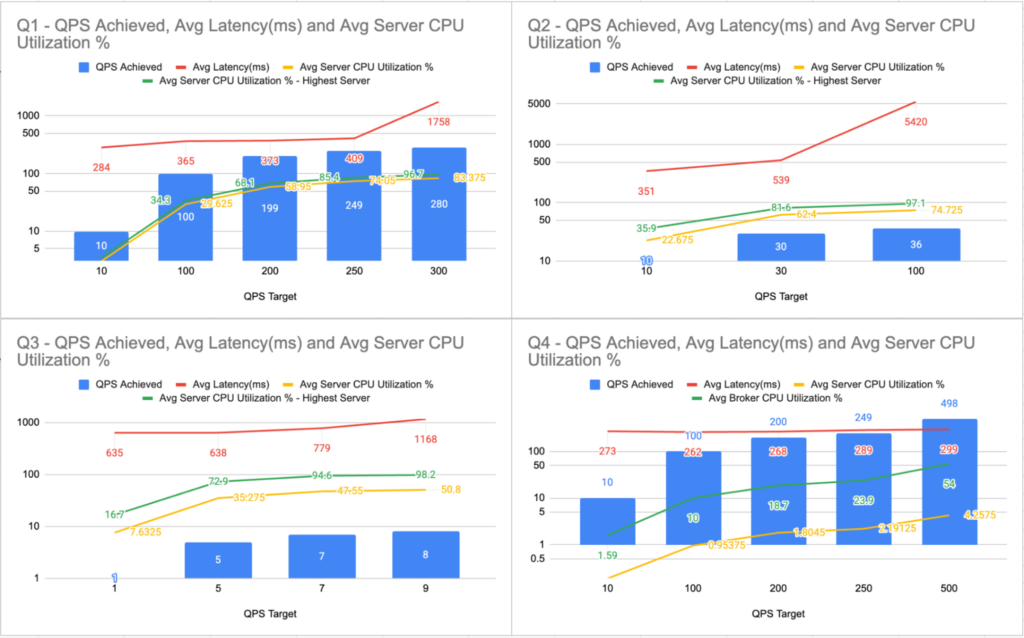
Maximum Sustainable QPS (Index Pinning Only)
| Query | Max Sustained QPS | Avg Latency (ms) | Bottleneck |
|---|---|---|---|
| Q1: Filtered Count | 249 | 409 | Server CPU |
| Q2: Selective Aggregation | 30 | 539 | Server CPU |
| Q3: Time-Bucketed Agg | 7 | 779 | Server CPU |
| Q4: Map Column Agg | 498 | 299 | Broker CPU |
All numbers above are with index pinning only – indexes pinned in local disk, Parquet data still read from S3 on every query. Each query type was tested independently – only one query type running at a time. The bottleneck varies by query pattern: broad scans (Q1–Q3) are server-CPU bound, while highly selective index lookups (Q4) shift the bottleneck to the broker.
Cost per query at scale
At maximum sustained QPS, the economics change dramatically from the sequential estimates:
| Query | Max QPS | Queries/hr | $/Query at Scale | vs Sequential |
|---|---|---|---|---|
| Q1 | 249 | 896,400 | $0.000005 | 240× cheaper |
| Q2 | 30 | 108,000 | $0.00004 | 30× cheaper |
| Q3 | 7 | 25,200 | $0.00017 | 7× cheaper |
| Q4 | 498 | 1,792,800 | $0.0000024 | 500× cheaper |
Even Q3, the heaviest query at scale costs only $0.00017 per query. Q4, the query that takes other engines 9–27 seconds each, costs less than a quarter of a cent per thousand queries.
Under the Hood: Why StarTree’s Approach is Different
Let’s go back to the library analogy. All three systems are querying data in the same format (Parquet) in the same warehouse (S3). The difference is how they find what they’re looking for.
Trino and ClickHouse use Iceberg metadata — essentially shelf labels. The Iceberg manifest tells them: “Files in partition org_id=184833768 are in this directory. File X has timestamps between A and B.” This lets them skip entire files (or shelves) that can’t possibly match. But once they open a file, they read through all the rows in it.
Pinot builds actual indexes — the card catalog. Inverted indexes map values back to document IDs (“these 47 rows have metric=’tk_cache'”). Range indexes map value ranges to document IDs (“these rows have timestamps in your window”). Sorted indexes allow binary search over ordered data.
The difference in granularity:
| Trino & ClickHouse | StarTree (Pinot): Iceberg Tables | |
|---|---|---|
| What it uses | Iceberg manifests (partition info, file-level min/max) | Purpose-built indexes (inverted, range, sorted) |
| Skips at | File and row-group level | Individual row level |
| How it filters | Scan column data, apply predicate | Index lookup — go directly to matching rows |
| Map columns | Scan the entire map column | Indexes on extracted map keys — same speed as top-level columns |
That last row is especially important. For Q4, Trino and ClickHouse have to scan through the entire map column because there’s no way to push a predicate like dimensions['node'] = 'xyz' into Parquet file statistics. Pinot, on the other hand, extracts map keys into indexed columns during segment creation — so filtering on dimensions['node'] is no different from filtering on org_id.
And all of this happens without copying the data. The Parquet files on S3 are the source of truth. Pinot’s segments are pure index metadata — lightweight structures that point back to the original data.This also explains the caching behavior we observed. When indexes are this effective at reducing data access, traditional data caching (like FS cache or disk page cache) adds less value — because there’s less data to cache. The acceleration comes from not reading data in the first place, rather than reading it faster from a local cache.
Keeping It Fair
Benchmarks published without transparency invite skepticism — and rightly so. Here’s how we made sure this comparison is defensible.
Same data, same queries. All three systems query the same Parquet data on S3 with equivalent SQL. The storage structure was optimized for each system’s requirements to ensure a fair comparison.
Same measurement. All latencies were measured end-to-end from JMeter. This captures real client-observed latency, not internal server-side execution time. Pinot’s internal timeUsedMs metric reports much lower numbers (e.g., ~19ms for Q2), but we report client-observed latency for consistency across all three systems.
Every system gets its best shot. We didn’t just throw each system at the problem — we configured each one with its best available approach for querying S3-resident data:
| System | What It Uses | Data Format |
|---|---|---|
| StarTree (Pinot) | Index-only segments (inverted, range, sorted) over Parquet | Raw Parquet (partitioned by org_id) |
| Trino | Iceberg connector with partition pruning and column statistics | Optimized Iceberg Parquet (granular partitioning + metadata) |
| ClickHouse | icebergS3Cluster() with same Iceberg metadata as Trino | Optimized Iceberg Parquet (granular partitioning + metadata) |
No proprietary format conversion. ClickHouse MergeTree was intentionally excluded because it converts Parquet into ClickHouse’s native columnar format. That would be equivalent to comparing Pinot’s local tables — not the lceberg Tables feature. Every system in this benchmark reads Parquet from S3 at query time.
Identical infrastructure. All three systems ran on the same hardware: 1 coordinator (m7g.xlarge, 16 GB RAM, 4 vCPUs, 128 GB disk) and 4 workers (r6gd.4xlarge, 128 GB RAM, 16 vCPUs, 800 GB disk each). No system got a resource advantage.
Conclusion
When data lives on object storage, how you query it matters enormously. This benchmark shows that the approach you choose — metadata-based pruning vs. purpose-built indexes over the same data — can mean the difference between seconds and sub-second response times.
The numbers tell a clear story:
- Raw Performance: Pinot is 9–39x faster than ClickHouse OSS and 4–21x faster than Trino without any local storage. With caching enabled, Pinot remains 5–37x faster than ClickHouse OSS and 4–17x faster than Trino.
- Sub-Second Latency: Every Pinot query completes in under 650ms with index pinning. This includes the complex map column aggregation that takes other systems 7–14 seconds.
- Drastically Lower Costs: On identical hardware, Pinot is 7.4x cheaper than Trino and 14.9x cheaper than ClickHouse ($0.0012/query vs. $0.009 and $0.018, respectively) while leaving massive CPU headroom for concurrent workloads.
- Concurrent throughput: Pinot sustains 7–498 QPS per query type on the same cluster, driving cost per query as low as $0.000005
StarTree delivers these results by doing something the other systems can’t: building lightweight, purpose-built indexes over Parquet data on S3 without moving, copying, or converting it. The Parquet files stay exactly where they are. They remain readable by every tool in the data lake ecosystem. Pinot simply adds a smart acceleration layer on top. For organizations with large volumes of data in open formats on object storage, this offers real-time query performance without the cost and complexity of data migration.
| StarTree (Pinot) | Trino | ClickHouse | |
|---|---|---|---|
| Data format on S3 | Original Parquet | Iceberg Parquet | Iceberg Parquet |
| Acceleration | Indexes (inverted, range, sorted) | Partition pruning, column stats | Partition pruning, column stats |
| Data duplication | None | Iceberg metadata only | Iceberg metadata only |
| Cost per query (no cache) | $0.0012 | $0.0090 | $0.0182 |
| Avg Server CPU | 7.1% | 31.3% | 44.8% |
| Max QPS (Q1/Q4) | 249 / 498 | N/A | N/A |
Get Started from here: Docs: Iceberg Table Onboarding via Data Portal
Try Iceberg Tables with StarTree — powered by Apache Pinot
The best way to experience the power of StarTree with Iceberg (or Delta Lake) tables is to book a demo or request a trial to run your own benchmark, on your own data, with your own queries