JSON (JavaScript Object Notation) is a lightweight data format representing structured information. It consists of key-value pairs and is often used for transmitting data between a server and a web application. JSON is commonly employed in APIs and web services to exchange data in a format that is easy for humans to read and machines to parse. In logs, JSON provides a structured alternative to plain text logging, making it easier to parse and analyze programmatically; JSON is also the de facto format for clickstream events(clicks, views, scrolls, etc.).
JSON support in Apache Pinot
With Apache Pinot, the JSON index enables fast value lookups, filtering, and aggregation on nested and semi-structured data — without flattening or denormalizing it at ingestion time. It works by building an inverted index that maps JSON keys and values (including nested fields via JSONPath) to the rows where they appear. During query execution, functions like JSON_MATCH use this index to quickly locate matching documents, avoiding the need to parse entire JSON blobs. This approach provides sub-second query performance, supports flexible schema-on-read analytics, and is ideal for use cases like event logs or clickstream data where payloads often contain complex JSON structures.
While Apache Pinot supports storing raw JSON for flexibility, it’s important to understand the trade-offs before relying on it for analytical workloads. JSON columns are convenient when dealing with semi-structured data, but they introduce performance and storage overheads. Since JSON is stored as a text blob, it consumes more space and requires parsing during ingestion and queries. Even though Pinot’s JSON index helps accelerate lookups, it can’t match the speed or efficiency of native typed columns — especially when running frequent filters or aggregations. Complex queries using JSON_MATCH or JSON_EXTRACT_SCALAR also tend to be harder to optimize and maintain at scale.
That’s why most production-grade Pinot setups flatten or extract key JSON fields into top-level columns. Doing so enables advanced indexing (like range, sorted, or star-tree indexes), improves compression, and dramatically reduces query latency. In essence, JSON storage in Pinot is best used for flexibility at the edges, while flattening critical fields ensures performance and predictability for analytical workloads — giving you the best of both worlds.
Flattening Techniques
Apache Pinot provides powerful ingestion-time transformation features that make it easy to flatten JSON data using mapper functions and configurable ingestion specs. In this section, we’ll explore practical examples of how and when to flatten JSON arrays, JSON objects, and extract fields from nested or stringified JSON payloads — all illustrated with screenshots from StarTree’s Data Portal to make the process more intuitive and GUI-driven.
An Example
Let’s take an example where an e-commerce platform tracks user activities on its website, such as page views, clicks, and purchases. This data might be captured in a nested JSON format, including user information, session data, product details, and timestamps.
The original nested JSON looks like this:
{
  "user": {
    "id": "12345",
    "name": "John Doe",
    "location": {
      "country": "USA",
      "city": "San Francisco"
    }
  },
  "session": {
    "sessionId": "abcde12345",
    "timestamp": "2024-08-06T12:34:56Z"
  },
  "event": {
    "type": "purchase",
    "product": [
      {
        "id": "98765",
        "name": "Wireless Mouse",
        "category": "Electronics",
        "price": 29.99
      },
      {
        "id": "98766",
        "name": "Wireless Keyboard",
        "category": "Electronics",
        "price": 39.99
      }
    ]
  }
}
Code language: JSON / JSON with Comments (json)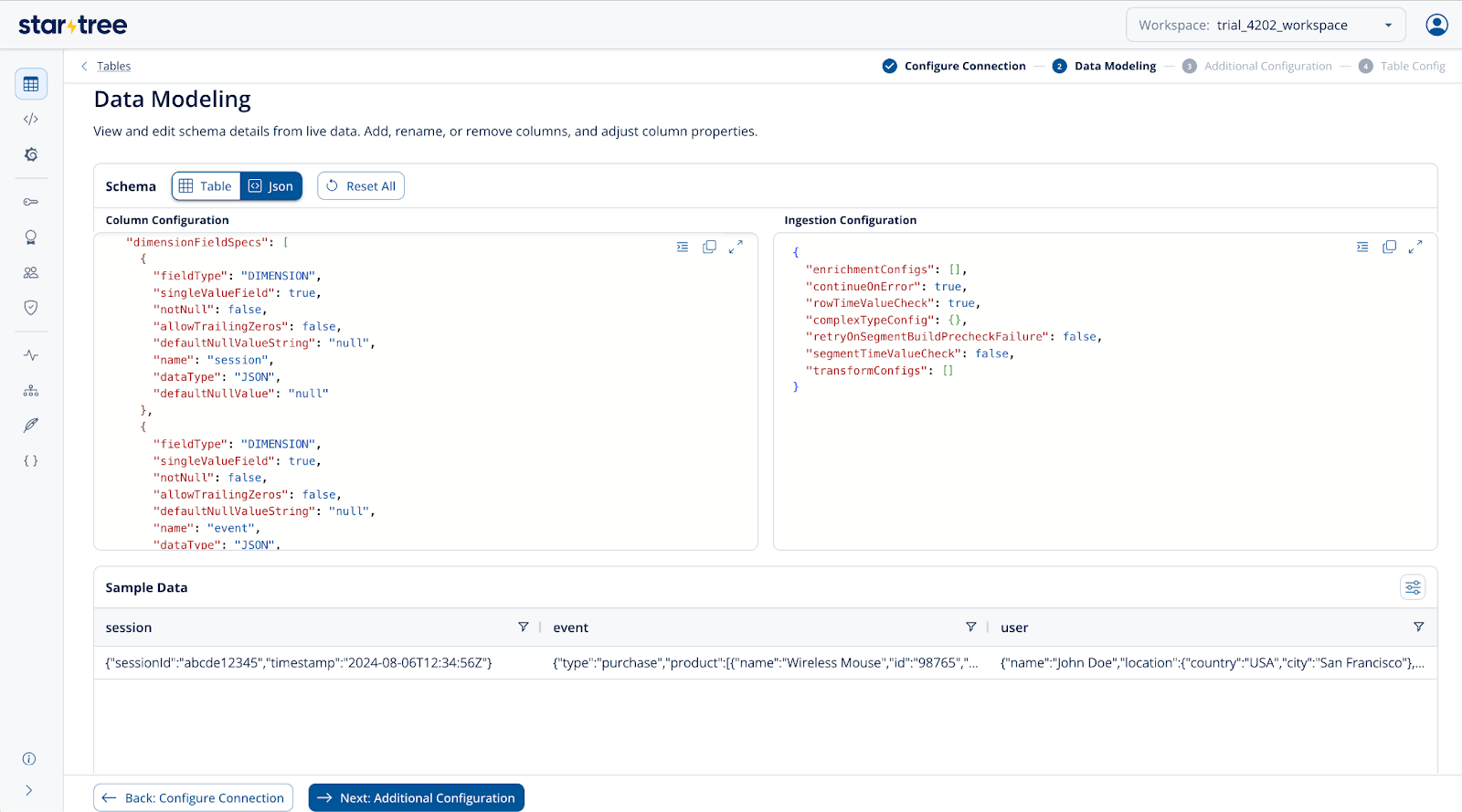
Flatten a JSON Array
The above nested JSON contains both arrays and objects. Flattening this structure helps break down complex, nested data into a more query-friendly format. Flattening a JSON array essentially expands each element into a separate row — making it easier to filter, aggregate, and join with other tables. However, be mindful of data explosion, as large arrays can significantly increase the number of rows and storage size. It’s best to flatten only the arrays that are relevant for analysis and keep the rest as-is to balance performance and data volume.
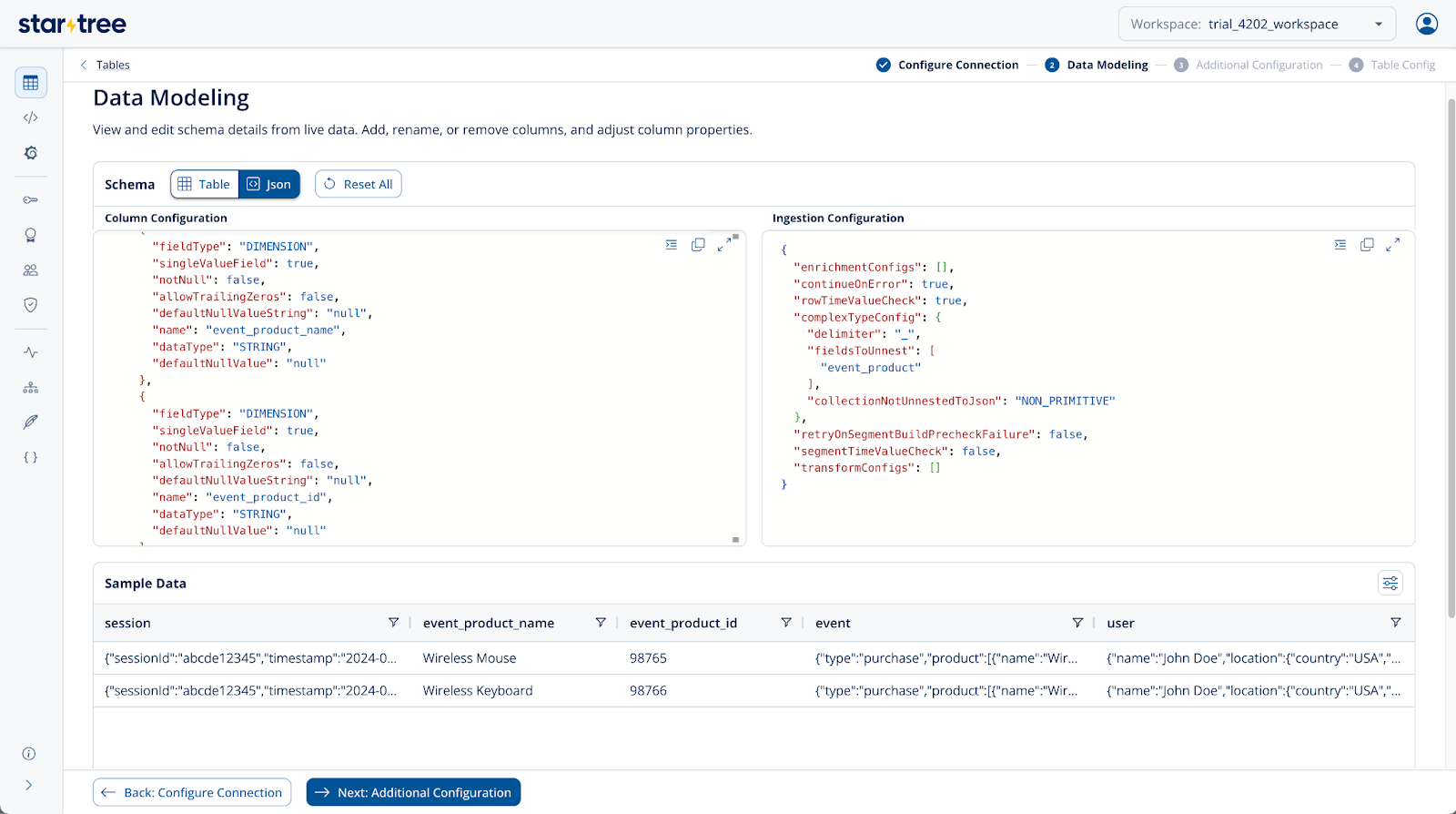
Add schema to the Pinot table schema as mentioned below. Notice how the new fields(event_product_name, event_product_id) are created with a delimiter of choice with parent and child JSON keys
{
  "schemaName": "preview_table",
  "primaryKeyColumns": null,
  "enableColumnBasedNullHandling": false,
  "dimensionFieldSpecs": [
    {
      "fieldType": "DIMENSION",
      "singleValueField": true,
      "notNull": false,
      "allowTrailingZeros": false,
      "defaultNullValueString": "null",
      "name": "session",
      "dataType": "JSON",
      "defaultNullValue": "null"
    },
    {
      "fieldType": "DIMENSION",
      "singleValueField": true,
      "notNull": false,
      "allowTrailingZeros": false,
      "defaultNullValueString": "null",
      "name": "event",
      "dataType": "JSON",
      "defaultNullValue": "null"
    },
    {
      "fieldType": "DIMENSION",
      "singleValueField": true,
      "notNull": false,
      "allowTrailingZeros": false,
      "defaultNullValueString": "null",
      "name": "user",
      "dataType": "JSON",
      "defaultNullValue": "null"
    },
    {
      "fieldType": "DIMENSION",
      "singleValueField": true,
      "notNull": false,
      "allowTrailingZeros": false,
      "defaultNullValueString": "null",
      "name": "event_product_name",
      "dataType": "STRING",
      "defaultNullValue": "null"
    },
    {
      "fieldType": "DIMENSION",
      "singleValueField": true,
      "notNull": false,
      "allowTrailingZeros": false,
      "defaultNullValueString": "null",
      "name": "event_product_id",
      "dataType": "STRING",
      "defaultNullValue": "null"
    }

  ],
  "metricFieldSpecs": [],
  "dateTimeFieldSpecs": [],
  "timeFieldSpec": null,
  "complexFieldSpecs": []
}Code language: JSON / JSON with Comments (json)
Add complex type config to the Pinot table configuration as mentioned below:
{
 "ingestionConfig": {
   "complexTypeConfig": {
      "delimiter": "_",
"fieldsToUnnest": ["event_product"],
      "collectionNotUnnestedToJson": "NON_PRIMITIVE"
   }
 }
}Code language: JSON / JSON with Comments (json)
With the above ingestion configuration, the table will flatten the given JSON Array and create two new columns and rows as shown below. This happens because the flattening is set at the event_product level.
Flatten a JSON Object
Similar to the above example, if your JSON contains only objects and no arrays, you can use the configuration below without the fieldsToUnnest field. This approach will fully flatten both JSON objects and arrays, making all nested fields accessible for querying. However, this method can significantly increase the number of records depending on the nesting depth and the configured unnesting level. When dealing with JSON objects, it’s best to flatten only the necessary fields to avoid excessive data expansion and maintain a clean, efficient schema. Using a consistent delimiter for nested keys also helps preserve clarity and prevent naming conflicts in the flattened output.
Add the schema to the Pinot table schema as mentioned below. Notice how the new fields(session_sessionId, session_timestamp) are created with a delimiter of choice with parent and child JSON keys.
{
  "schemaName": "preview_table",
  "primaryKeyColumns": null,
  "enableColumnBasedNullHandling": false,
  "dimensionFieldSpecs": [
    {
      "fieldType": "DIMENSION",
      "singleValueField": true,
      "notNull": false,
      "allowTrailingZeros": false,
      "defaultNullValueString": "null",
      "name": "session",
      "dataType": "JSON",
      "defaultNullValue": "null"
    },
    {
      "fieldType": "DIMENSION",
      "singleValueField": true,
      "notNull": false,
      "allowTrailingZeros": false,
      "defaultNullValueString": "null",
      "name": "event",
      "dataType": "JSON",
      "defaultNullValue": "null"
    },
    {
      "fieldType": "DIMENSION",
      "singleValueField": true,
      "notNull": false,
      "allowTrailingZeros": false,
      "defaultNullValueString": "null",
      "name": "user",
      "dataType": "JSON",
      "defaultNullValue": "null"
    },
    {
      "fieldType": "DIMENSION",
      "singleValueField": true,
      "notNull": false,
      "allowTrailingZeros": false,
      "defaultNullValueString": "null",
      "name": "session_sessionId",
      "dataType": "STRING",
      "defaultNullValue": "null"
    },
    {
      "fieldType": "DIMENSION",
      "singleValueField": true,
      "notNull": false,
      "allowTrailingZeros": false,
      "defaultNullValueString": "null",
      "name": "session_timestamp",
      "dataType": "STRING",
      "defaultNullValue": "null"
    }
  ],
  "metricFieldSpecs": [],
  "dateTimeFieldSpecs": [],
  "timeFieldSpec": null,
  "complexFieldSpecs": []
}Code language: JSON / JSON with Comments (json)
Add complex type config to the Pinot table configuration as mentioned below:
{
 "ingestionConfig": {
   "complexTypeConfig": {
      "delimiter": "_",
      "collectionNotUnnestedToJson": "NON_PRIMITIVE"
   }
 }
}
Code language: JSON / JSON with Comments (json)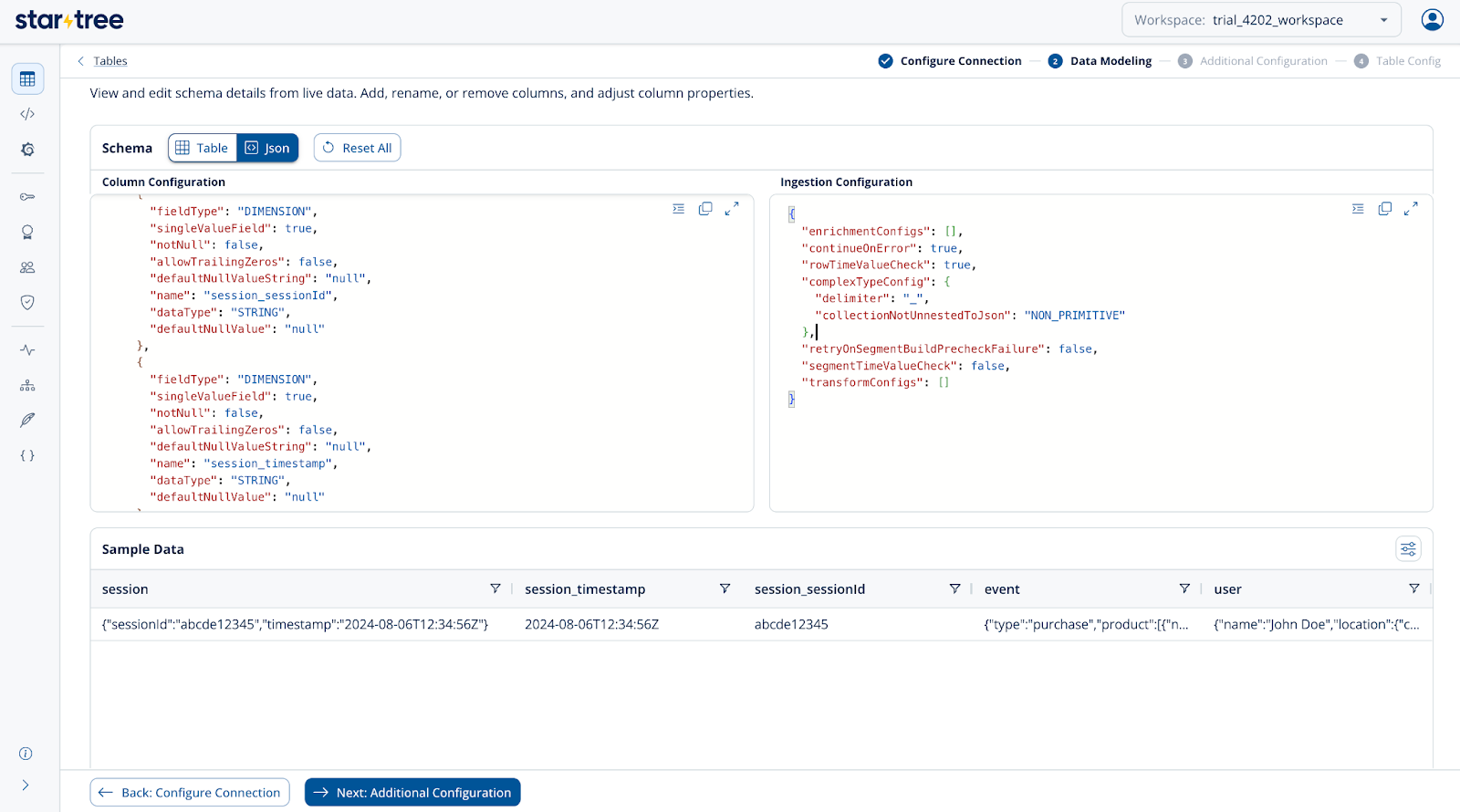
Renaming a field upon JSON Flattening
The above method automatically generates column names in a hierarchical format — typically combining parent and child field names with the configured delimiter (for example, session_sessionId). While this works well for most cases, you may want to define more readable or standardized names for your flattened fields. To achieve this, you can use the transformConfig section within ingestionConfig to explicitly rename or map fields during ingestion. This gives you full control over the resulting schema and ensures that your column names remain consistent with your data model or naming conventions. Remember that any custom column name you define through transformations must also be declared in the table schema, so Pinot can correctly validate and index the field at ingestion time.
{
  "complexTypeConfig": {
    "delimiter": "_"
  },
  "transformConfigs": [
    {
      "columnName": "sessionId",
      "transformFunction": "session_sessionId"
    }
  ]
}Code language: JSON / JSON with Comments (json)
Extract fields from JSON
If your goal is to extract only a few specific nested fields from a larger JSON object — rather than flattening the entire structure — you can use Pinot’s JSON path–based field extraction. This approach is lightweight, efficient, and ideal when you only need to surface select attributes for querying or aggregation.
Let’s take the same example JSON payload and extract just the key fields we care about: user ID, session ID, session timestamp, event type, product ID, and event product price. Instead of expanding every nested key, we can precisely target these fields using transformConfig and transform functions like JSONPath expressions within the ingestion configuration. This method not only keeps your dataset compact but also reduces ingestion overhead and avoids unnecessary column proliferation.
Below is a sample transformConfig snippet that demonstrates how to extract these fields directly from the nested JSON, mapping them into clean, top-level columns ready for fast querying.
{
  "tableConfig": {
    "tableName": "user_activities",
    "ingestionConfig": {
      "transformConfigs": [
        {
          "columnName": "user_id",
          "transformFunction": "JSONPATHLONG(user, '$.id')"
        },
        {
          "columnName": "session_id",
          "transformFunction": "JSONPATHSTRING(session, '$.sessionId')"
        },
        {
          "columnName": "session_timestamp",
          "transformFunction": "JSONPATHSTRING(session, '$.timestamp')"
        },
        {
          "columnName": "event_type",
          "transformFunction": "JSONPATHSTRING(event, '$.type')"
        },
        {
          "columnName": "event_product_id",
          "transformFunction": "JSONPATHARRAY(event, '$.product[*].id)"
        },
        {
          "columnName": "event_product_price",
          "transformFunction": "JSONPATHARRAY(event, '$.product[*].price')"
        }
      ]
    }
  }
}
Code language: JSON / JSON with Comments (json)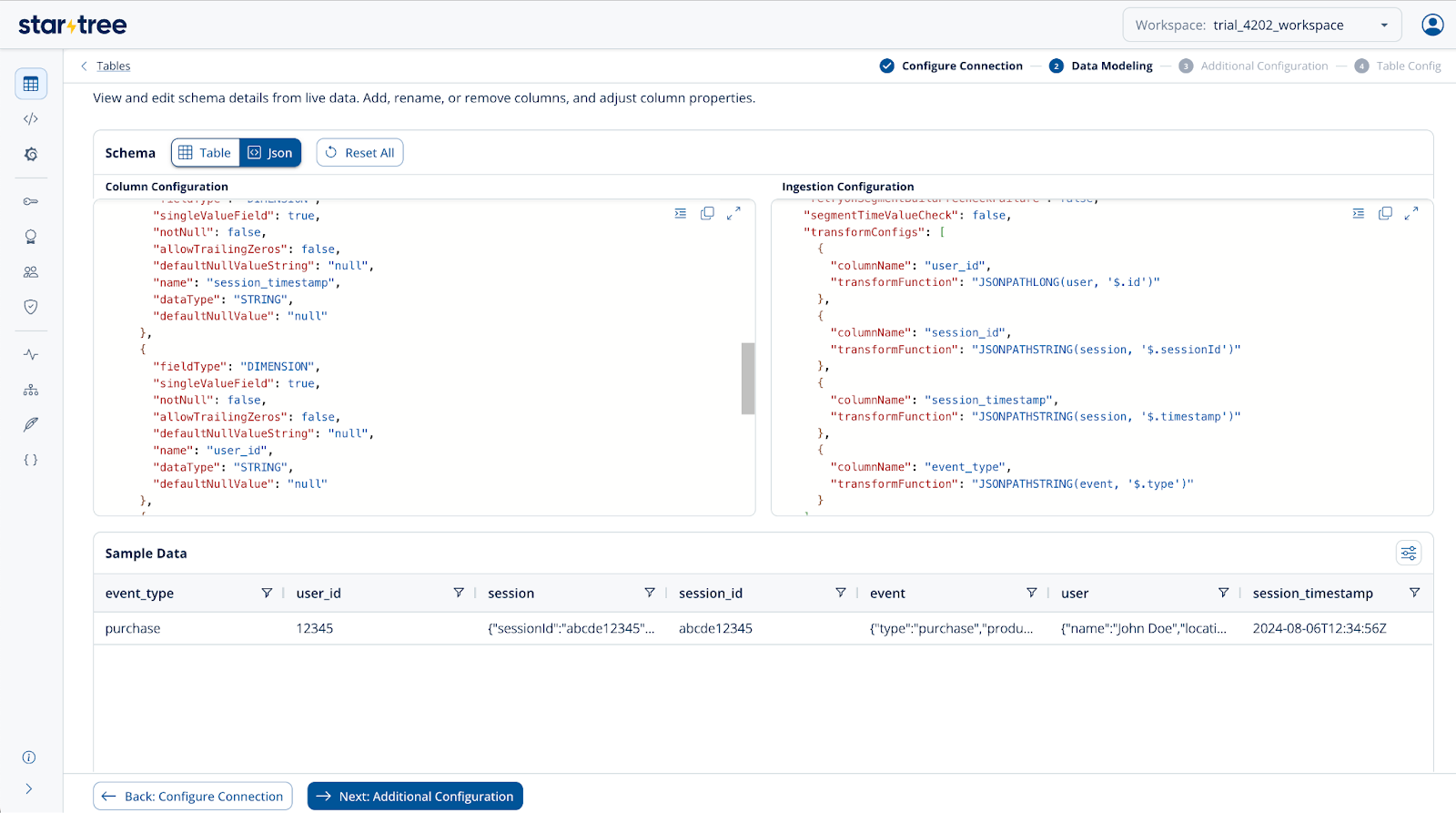
With the above configuration, make sure to define the columns event_product_id and event_product_price as multi-value fields in the schema by setting singleValueField to false.
These transform functions are especially useful when you need to extract and work with only a few fields from a JSON object, rather than flattening the entire structure into separate columns.
A few key points to remember when flattening or extracting fields from JSON:
JSONPATHSTRINGis used to extract the String data type from the parent JSON object.JSONPATHARRAYis used to extract a JSON array from the parent JSON object.JSONPATHLONGis used to extract Long data type from a JSON object.- The symbol
$always refers to the root (or parent) JSON object.
Using these functions thoughtfully helps keep your schema clean and optimized while giving you precise control over how JSON data is ingested into Pinot.
Unnest a Stringified JSON Array
In some datasets, especially those coming from logs or third-party APIs, JSON arrays are stored as stringified JSON — meaning the array is encoded as a text string rather than a native JSON structure. In such cases, Pinot’s regular Unnest operation won’t work directly because the system interprets the data as plain text instead of a structured array.
To handle this scenario, the stringified JSON first needs to be parsed or converted into a proper Array or Map field using the enricher configuration in the ingestion config. Once converted, you can safely apply Unnest to expand the array elements into individual records.
This approach is particularly useful when dealing with log ingestion, clickstream data, or external data pipelines where arrays are often serialized into strings for transport. Parsing them back into structured JSON at ingestion ensures you retain full flexibility for filtering, joining, and aggregation — while keeping your pipeline resilient to semi-structured input formats.
Let’s take an example:
Sample Data:
{
  "sports": "cricket",
  "players": "[{\"name\":\"Joe Root\"},{\"name\":\"Sachin\"},{\"name\":\"Ricky\"}]",
  "event_time": "2025-04-24T20:45:56"
}
Code language: JSON / JSON with Comments (json)
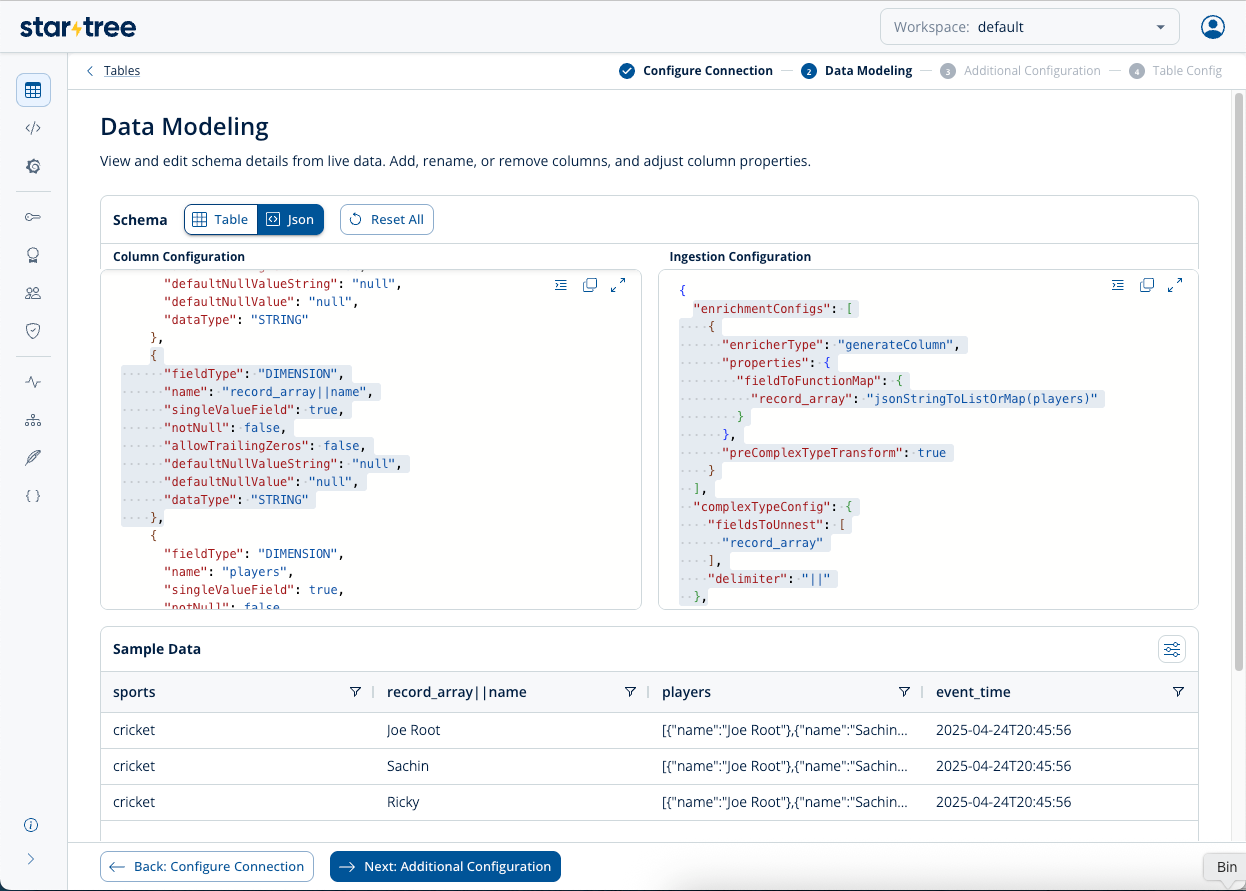
Before the above JSON can be unnested, it needs to be converted to an intermediate column, say record_array. Use enrichmentConfigs with the function: jsonStringToListOrMap(...).
Keeping preComplexTypeTransform as true makes sure the pre-complex type transformer processes data before unnesting or flattening. Please note that the intermediate column, record_array, also needs to be mentioned in the Schema.
"enrichmentConfigs": [
  {
    "enricherType": "generateColumn",
    "properties": {"fieldToFunctionMap":{"record_array":"jsonStringToListOrMap(players)"}},
    "preComplexTypeTransform": true
  }
]
Code language: JSON / JSON with Comments (json)
Now that string-enclosed JSON is converted to an Array or a Map, actual unnesting needs to be configured; use complexTypeConfig for unnesting an Array as usual. You can use any delimiter.
"complexTypeConfig": {
 "fieldsToUnnest": [
   "record_array"
 ],
 "delimiter": "||"
}
Code language: JSON / JSON with Comments (json)
Notice the string-encoded data is un-nested, and the record is split into multiple records. The un-nested values appear in the new field record_array||name.
Summary
Apache Pinot offers the ability to store and query JSON data. Pinot’s JSON index enables fast lookups, aggregations and filtering on semi-structured data. However storing JSON data can be inefficient at scale, and query is not as performant as native typed columns. Most production Pinot systems flatten or extract JSON fields into native columns. StarTree Cloud makes this step easy with JSON unnesting features that can be configured through the StarTree Data Portal or through ingestionConfig – just another way StarTree makes Apache Pinot easier and simpler for busy data teams.
To get a demo of StarTree, or to learn more about how to make the most of JSON data in Apache Pinot, Book a Demo or Talk to one of our Pinot Experts.